
IC Battery Saver3.2.8 - Get APK
You'll be able to download in few seconds.
Publisher Description
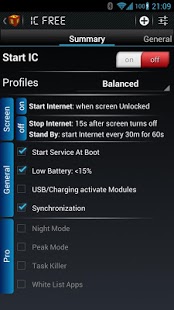
Battery Saver
Internet Commander is an application designed for managing your internet connection and saving precious battery life. As Mobile Internet and Wi-Fi are of the most battery draining functionalities in the Android OS, they need to be managed properly.
Regrettably Android has no solution for this "problem" and here is where Internet Commander comes into play.
Internet Commander is a fully configurable app which automatically handles Internet connections by turning them on when it is needed and off when not.
The app has plenty of
options
to personalize it to your needs:
- 3 standard Profiles, which apply the app to any user’s needs
- Ability to create new Profiles and to load existing ones
- Automatic Internet Control even in Stand-By mode
- Control over the appearance and design of the status bar notifications
- Full control over
Wifi, 3G and Bluetooth
- Wifi and 3G On/Off WIDGET
- Special management when the battery charge is low
- Automatic Internet Control even in Stand-By mode
- High variety of triggers for activating Internet connections
- Nice graphical user interface
- Easy and intuitive usage
- Sync your accounts, messages and mails so you are always up to date
Benefits
:
- Automatic Internet connection management
- Extending battery life (up to 5 days on SGSII)
- No need of charging every night
- Minimum Memory usage
- Getting e-Mails, WhatsApp and Facebook messages in Stand-By mode
- And many more...
Internet Commander
Pro options
:
-
Night Mode
- Peak Mode
- Fully configurable options and timings
-
Task Killer
- White list Apps (prevent Internet from stopping, e.g. Online Radio)
https://www.facebook.com/InternetCommander
Tags: Battery Saver, Juice Defender, Green Power, Battery Booster, Internet, 3G, easy battery, saver Akku - Battery Indicator
About IC Battery Saver
The company that develops IC Battery Saver is Ivaylo Dimitrov. The latest version released by its developer is 3.2.8.
To install IC Battery Saver on your Android device, just click the green Continue To App button above to start the installation process. The app is listed on our website since 2019-02-16 and was downloaded 0 times. We have already checked if the download link is safe, however for your own protection we recommend that you scan the downloaded app with your antivirus. Your antivirus may detect the IC Battery Saver as malware as malware if the download link to de.ivo.internetcom is broken.
How to install IC Battery Saver on your Android device:
- Click on the Continue To App button on our website. This will redirect you to Google Play.
- Once the IC Battery Saver is shown in the Google Play listing of your Android device, you can start its download and installation. Tap on the Install button located below the search bar and to the right of the app icon.
- A pop-up window with the permissions required by IC Battery Saver will be shown. Click on Accept to continue the process.
- IC Battery Saver will be downloaded onto your device, displaying a progress. Once the download completes, the installation will start and you'll get a notification after the installation is finished.
Program Details
System requirements
Download information
Pricing
Version History
version 3.2.8
posted on 2019-02-16
Wifi, 3G and Bluetooth
- Wifi and 3G On/Off WIDGET
version 3.2.6
posted on 2014-12-10
Support for Android Lollipop,Many general bug fixes
version 3.0.3
posted on 2013-03-25
Several fixes and updates
Disclaimer
External Download
We do not host IC Battery Saver on our servers. We did not scan it for viruses, adware, spyware or other type of malware. This app is hosted by Galad and passed their terms and conditions to be listed there. We recommend caution when installing it.
The APK Download link for IC Battery Saver is provided to you by apps112.com without any warranties, representations or guarantees of any kind, so access it at your own risk.
If you have questions regarding this particular app contact the publisher directly. For questions about the functionalities of apps112.com contact us.
